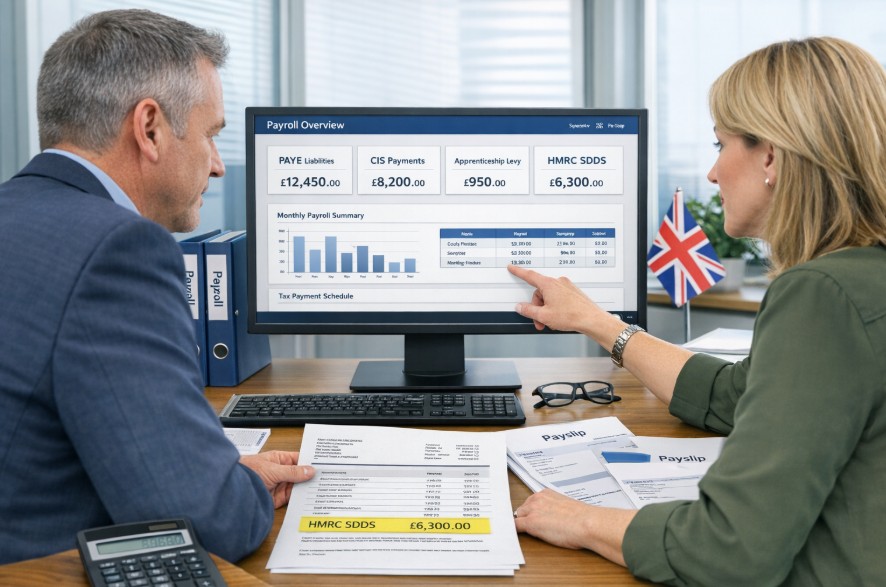

When you see “HMRC SDDS” on your bank statement, it usually means HMRC has collected an authorised recurring Direct Debit for your PAYE, National Insurance, CIS deductions, or Apprenticeship Levy.
HMRC SDDS payment is the system employers use to automate payroll-related tax payments, helping you avoid missed deadlines and manual bank transfers.
For most UK businesses, the payment is collected shortly after the 22nd of the month, or four working days after you submit your return if you file after the 19th.
Key points to know:
- HMRC SDDS is a recurring Direct Debit linked to your payroll returns
- It can cover PAYE, CIS, National Insurance, and Apprenticeship Levy
- You must set it up at least four working days before payment is due
- Payments appear on your statement as “HMRC SDDS”
- HMRC gives at least three working days’ notice before collection
What Is an HMRC SDDS Payment?
An HMRC SDDS payment is the recurring Direct Debit system used by HMRC to collect employer liabilities automatically. The amount is based on the figures you submit through your Full Payment Submission (FPS) or Employer Payment Summary (EPS).
Rather than making a manual payment each month, you authorise HMRC once through your online account. After that, HMRC automatically collects the amount due from your bank account whenever payroll taxes become payable.
The payment usually appears on your bank statement as “HMRC SDDS”, which often causes confusion for business owners seeing it for the first time.
“HMRC SDDS is simply the description used when your employer tax liabilities are collected automatically by Direct Debit,” explains an HMRC payroll adviser.
The system is primarily used for:
- PAYE Income Tax and National Insurance
- Construction Industry Scheme deductions
- Apprenticeship Levy
- Certain Class 1A National Insurance liabilities
Understanding how HMRC SDDS works helps you manage your payroll obligations more efficiently, avoid missed payments, and keep your business compliant with UK tax requirements.
Why Does HMRC SDDS Appear on Your Bank Statement?

If “HMRC SDDS” appears on your statement, it means HMRC has taken a scheduled payment from the bank account linked to your Business Tax Account.
The payment appears because you previously set up a variable Direct Debit. HMRC then calculates the amount due from your payroll return and automatically takes the money on the appropriate date.
For most employers, this is a normal and legitimate transaction. It helps reduce the risk of late payment penalties and removes the need to manually authorise a bank transfer every month.
| Bank Statement Entry | What It Means |
| HMRC SDDS | Automatic recurring Direct Debit for employer taxes |
| HMRC NDDS | One-off Direct Debit payment |
| HMRC VAT DD | Separate VAT Direct Debit collection |
If you do not recognise the payment, log in to your HMRC online account and compare the amount with your latest PAYE or CIS submission.
What Does HMRC SDDS Cover for UK Businesses?
HMRC SDDS is designed mainly for employer-related liabilities. It does not collect every type of tax, but it covers the most common payroll charges.
PAYE and National Insurance
The largest part of most HMRC SDDS payments is PAYE. This includes the Income Tax and National Insurance contributions you deduct from employee wages.
Your payment may also include:
- Employee Income Tax deductions
- Employer and employee Class 1 National Insurance
- Student Loan deductions
- Class 1A National Insurance on some benefits
CIS Deductions
If you operate within the Construction Industry Scheme, HMRC SDDS can also collect CIS deductions automatically. This is especially useful for contractors making regular monthly submissions.
Apprenticeship Levy
Businesses with an annual pay bill above £3 million may also need to pay the Apprenticeship Levy. HMRC includes this amount within the same recurring SDDS collection.
| Liability Type | Covered by HMRC SDDS? |
| PAYE Income Tax | Yes |
| National Insurance | Yes |
| CIS deductions | Yes |
| Apprenticeship Levy | Yes |
| Penalties and interest | No |
| Payments above £20 million | No |
“The system only collects the amount shown on your submitted return, so accuracy in your payroll filing is essential,” notes a senior HMRC compliance officer.
How Does HMRC SDDS Work for PAYE, CIS, and Levy Payments?
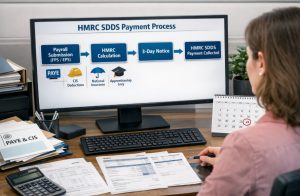
Once you have set up your Direct Debit, HMRC automatically matches your submitted payroll return to your bank details.
The process works in a straightforward sequence:
- You submit your FPS or EPS through payroll software.
- HMRC calculates the total due.
- HMRC sends you a notice at least three working days before collection.
- The payment is taken automatically from your account.
Because the amount changes according to your payroll, HMRC SDDS is known as a variable Direct Debit.
Example: Employer Using HMRC SDDS
To explain how HMRC SDDS works, I can describe a typical example based on HMRC guidance.
A manufacturing company in Manchester submits its payroll return on 16 June, including PAYE, National Insurance, and Apprenticeship Levy. HMRC then sends a confirmation email on 19 June with the amount and collection date.
“HMRC sends advance notice before collecting the payment, which is then taken automatically shortly after the 22nd of the month.”
The payment is collected from the company’s bank account and appears as “HMRC SDDS.” Without this system, the employer would need to make manual payments each month, so SDDS helps save time and ensures payments are made on time.
This example shows how SDDS simplifies payroll management, reduces admin work, and helps ensure payments are made on time.
When Does HMRC Take an SDDS Payment?
HMRC usually takes the payment shortly after the 22nd of the month if you file your payroll return on time. This gives employers enough time to submit payroll while ensuring HMRC receives the money by the deadline.
Standard Collection Date
For monthly employers, payment is normally collected shortly after the 22nd of each month.
For quarterly employers, payment is usually collected shortly after one of the following dates:
- 22 July
- 22 October
- 22 January
- 22 April
If you pay quarterly, you must still continue to submit your payroll return every month. HMRC simply combines the amounts and collects the total at the end of the quarter.
If You File After the 19th
If you submit your payroll return after the 19th of the month, HMRC normally takes the payment four working days after the date you file.
This rule allows HMRC enough time to process your return and calculate the correct amount before collecting the money.
Example: Employee and Payroll Delay
An employee in a small retail business notices that their payslip has been processed later than usual because the employer did not submit payroll until 21 September.
The employer then receives a message from HMRC explaining that the SDDS payment will now be collected four working days after the filing date instead of shortly after 22 September.
The employee still receives their wages as normal, but the employer sees the tax payment leave the business account later than expected.
| Filing Date | Likely Collection Timing |
| Filed on or before 19th | Shortly after 22nd |
| Filed after 19th | Four working days after filing |
| Quarterly return | Shortly after quarter end and 22nd |
You should therefore try to submit payroll before the 19th whenever possible to keep the payment schedule consistent.
How Do You Set Up an HMRC SDDS Direct Debit?
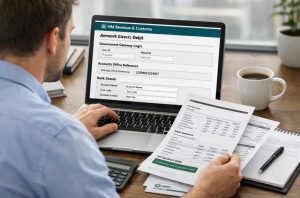
To use HMRC SDDS, you must first create a Direct Debit through your HMRC online account or Business Tax Account. The process only needs to be completed once unless you change bank accounts or cancel the mandate.
Once set up, HMRC can continue collecting future payments automatically without requiring further approval each month.
Before You Begin
You will need:
- Your Government Gateway login details
- Your 13-character Accounts Office reference number
- Your business bank account details
- At least four working days before the payment deadline
Your Accounts Office reference number is especially important because HMRC uses it to link the Direct Debit to the correct PAYE scheme.
Steps to Set Up the Direct Debit
- Sign in to your HMRC PAYE account
- Select the option to pay by Direct Debit
- Enter and confirm your bank details
- Authorise the Direct Debit mandate
- Wait for HMRC confirmation that the arrangement is active
If you have not used the Direct Debit for more than two years, it is worth checking with your bank that it is still active before relying on it.
Who Cannot Use HMRC SDDS?
You cannot use this method if:
- Your payment is £20 million or more
- You are paying from an overseas bank account
- You are exempt from filing online
- You are an insolvency practitioner
- You are a CIS contractor not enrolled for PAYE online
“Employers should set up the Direct Debit at least four working days before the due date, otherwise the first payment may fail,” advises an HMRC customer support manager.
If any of these restrictions apply to your business, you will need to use another payment method, such as Faster Payments, CHAPS, or Bacs.
What Reference Number Do You Need for HMRC SDDS Payments?
Every HMRC SDDS payment uses your 13-character Accounts Office reference number. This reference is unique to your business and links the payment to the correct PAYE account.
You can find the number:
- In your HMRC online account
- On the letter you received when registering as an employer
- Through your accountant or payroll provider
If you enter the wrong reference number, your payment may not be matched correctly and HMRC could treat it as unpaid.
For early or late payments, you must add four extra digits to the end of the reference.
| Payment Period | Extra Digits Example |
| May to June 2024 monthly payment | 2502 |
| April to July 2024 quarterly payment | 2503 |
| October 2023 annual payment | 2407 |
For example, if your Accounts Office reference is 123PA00123456 and you are paying late for May to June 2024, the full reference would become 123PA001234562502.
What Should You Do If No PAYE Payment Is Due?

If you have not paid any employees during a tax month, you still need to tell HMRC. Otherwise, HMRC may estimate the amount you owe and issue a penalty notice.
You do this by submitting an Employer Payment Summary (EPS).
The EPS must be sent by the 19th of the following month. For example, if you paid no staff in May, you must submit the EPS by 19 June.
If you know in advance that no employees will be paid for several months, you can notify HMRC for up to 12 months through the same EPS process.
This rule also applies to CIS contractors who have no deductions to report.
What Is the Difference Between HMRC SDDS and HMRC NDDS?
Many employers confuse HMRC SDDS and HMRC NDDS, but the key difference is how payments are made and managed.
| Feature | HMRC SDDS | HMRC NDDS |
| Payment type | Recurring Direct Debit | One-off Direct Debit |
| Setup | Set up once | Authorise each payment |
| Amount | Variable based on returns | Fixed per transaction |
| Usage | Regular PAYE, NIC, CIS payments | Single or occasional payments |
| Bank reference | Appears as “HMRC SDDS” | Appears as “HMRC NDDS” |
In simple terms, SDDS is ideal for ongoing automated tax payments, while NDDS suits one-off payments where you want more control over each transaction
What Common Mistakes Should Businesses Avoid?
Many businesses make simple but costly errors when using HMRC SDDS, often leading to delays or penalties. Understanding these common mistakes can help you stay compliant and avoid unnecessary issues.
Key mistakes to avoid:
- Setting up Direct Debit too late: You must allow at least 4 working days before the due date, or HMRC may not collect the payment on time.
- Using the wrong reference number: Incorrect Accounts Office references can delay payment allocation and trigger reminders or penalties.
- Trying to pay penalties via SDDS: HMRC SDDS only covers regular tax liabilities. Penalties and interest must be paid separately.
- Not submitting an EPS when required: Even if no employees are paid, HMRC still expects an Employer Payment Summary (EPS).
Avoiding these mistakes ensures smoother payroll management and helps your business stay on track with HMRC requirements.
How Can You Check HMRC Has Received Your Payment?

You can check if HMRC has received your payment by logging into your online PAYE account. In most cases, HMRC updates your account within six working days after the Direct Debit is collected.
The payment should appear alongside your latest payroll submission, making it easy to match amounts.
To confirm everything is correct:
- Check your PAYE account for the recorded payment
- Match it with your bank statement entry labelled “HMRC SDDS”
If the payment does not appear after six working days, you should contact HMRC or your bank to ensure the Direct Debit was processed successfully and there are no issues with your account.
Conclusion
HMRC SDDS payment is the simplest way for UK businesses to manage recurring PAYE, CIS, National Insurance, and Apprenticeship Levy liabilities.
Once the Direct Debit is set up, HMRC automatically collects the correct amount based on your payroll submissions, helping you stay compliant and avoid late payment penalties.
The key is to set up the Direct Debit in good time, use the correct Accounts Office reference number, and remember that penalties and interest are not included.
If you see “HMRC SDDS” on your bank statement, it is usually a legitimate employer tax payment collected by HMRC.
FAQs About HMRC SDDS Payment
Is HMRC SDDS a legitimate charge?
Yes. HMRC SDDS is a legitimate Direct Debit description used when HMRC collects employer tax liabilities automatically.
How many days before the deadline should you set up HMRC SDDS?
You should set it up at least four working days before the payment due date.
Can HMRC SDDS collect CIS and Apprenticeship Levy?
Yes. HMRC SDDS can collect CIS deductions and Apprenticeship Levy alongside PAYE and National Insurance.
Does HMRC SDDS collect penalties or interest?
No. Penalties and interest must be paid separately using another HMRC payment method.
What happens if you file payroll after the 19th?
HMRC normally collects the payment four working days after you submit the return.
Can you use HMRC SDDS from an overseas bank account?
No. HMRC SDDS cannot be used with an overseas bank account. You would need to pay by CHAPS or another method.
What should you do if no employees were paid?
You must submit an Employer Payment Summary (EPS) by the 19th of the following month.